

You've named a star - now how do you actually see it? A free stargazing app turns your phone into a window on the night sky: hold it up, and augmented reality labels every star you point it at. This is the fastest route from a certificate to the real thing, and it works on any modern phone. Here is exactly how to do it, which apps are best, and what to do when the sky doesn't cooperate.
- Search by your star's catalogue number (e.g.
HIP 11767) or coordinates, not its dedicated name - the name lives only in the register's database. - Give the app access to location and motion sensors so its sky matches the sky above you.
- Many named stars are faint (magnitude 8–14); the app shows the exact spot, but you may need binoculars to see the star itself.
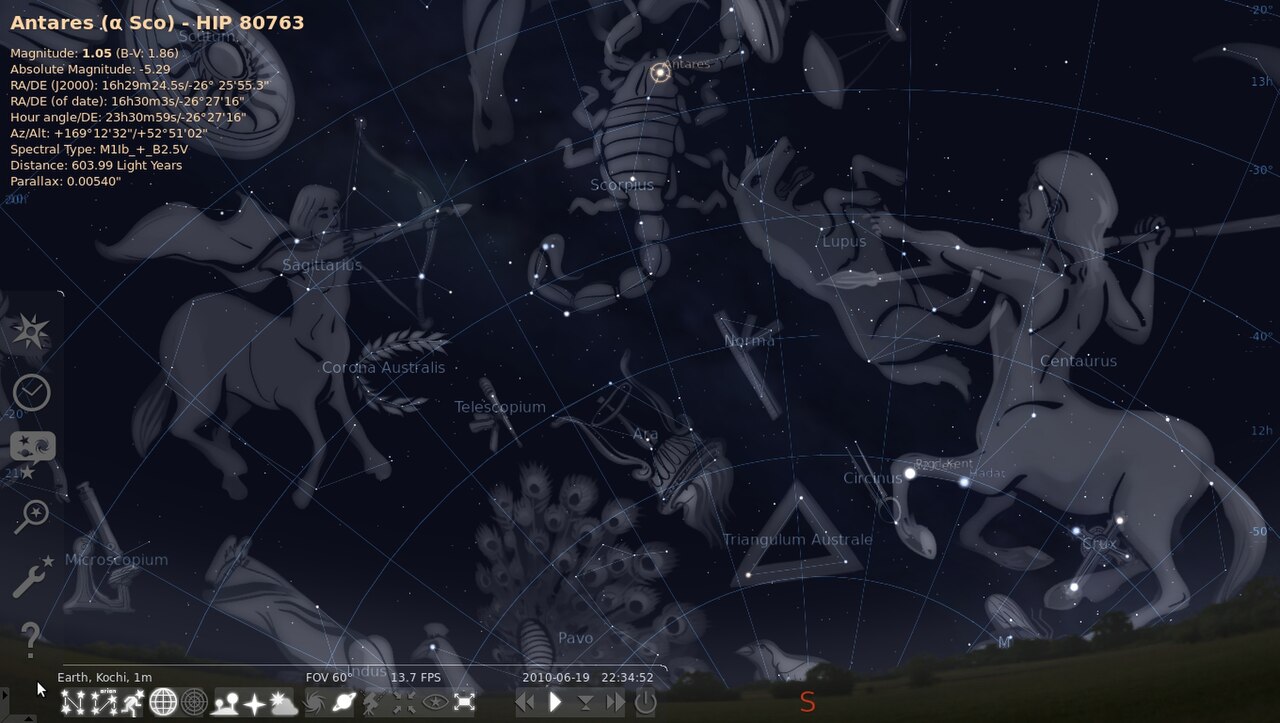
- Stellarium and SkySafari are the most capable for precise lookups; AR apps like Star Walk 2 and Sky Tonight are the most fun to point around.

Why an app is the fastest method
Every star has a precise "address" - two coordinates called Right Ascension and Declination (we explain them fully in how to find a star in the night sky). A stargazing app reads that address, knows your exact location, date and time, and computes where the star sits in your sky right now. Instead of memorising constellations, you simply follow an arrow. It's the same principle a Go-To telescope uses, but free and in your pocket.
Step by step: find your star in 2 minutes
- Install a star app (see the comparison below) and open it.
- Grant permissions. Allow access to your location and motion & orientation sensors - without them the app can't align its sky to yours.
- Open the search tool - usually a magnifying-glass icon.
- Type your star's identifier. Enter the registration number from your certificate (in a register's own app) or the catalogue number such as
HIP 11767, or the raw RA and Dec. A dedicated pet name will not be in a general app's database. - Follow the arrow. The app draws a path across the sky; move your phone along it until the target is centred.
- Look up and match. Compare the on-screen star field to the real sky. You are now pointing at the exact spot.
Tip: Do this on a clear, Moonless night away from bright lights, and give your eyes 20–30 minutes to dark-adapt. Use the app's night (red-light) mode to protect that adaptation.
The best free star-finder apps compared
All of these run on iOS and Android; several also run in a browser. Pick based on what you need - precise catalogue lookups, or a fun point-and-see AR view.
| App | Best for | Search by HIP / coordinates? | Cost |
|---|---|---|---|
| Stellarium Mobile | Accurate lookups & realistic sky | Yes - excellent | Free (Plus paid) |
| SkySafari | Depth of data; can control a telescope | Yes | Free tier / paid tiers |
| Star Walk 2 | Beautiful AR for beginners | Coordinates / catalogue search | Free (ads) / paid |
| Sky Tonight | Fast object search & tonight's events | Yes | Free / paid |
| SkyView Lite | Simplest AR, no clutter | Limited | Free |
If you registered your star with a partner register, its own app is usually quickest of all: StarRegistration.net and LabelStars.com point you straight to your dedication from the registration number. For a fuller rundown of finder apps, see our pillar guide's app comparison.
Why you search by number, not name
This trips up almost everyone, so it's worth being clear. The lovely name on your certificate exists in the register's catalogue - it is not part of the global scientific databases that general stargazing apps draw on. Those apps only know stars by their formal catalogue identifiers.
- Will work in any app: the HIP number (Hipparcos Catalogue), other catalogue IDs, or the RA/Dec coordinates.
- Will only work in the register's own app: your registration number and the dedicated name.
So keep your certificate handy: the HIP number and the coordinates are the keys that open every app. Not sure what those numbers mean? Our guide to what's on your certificate decodes each line.
Troubleshooting: when the sky won't line up
If the app's sky seems rotated or the arrow won't settle, work through this list:
| Symptom | Likely cause | Fix |
|---|---|---|
| Sky is rotated or drifting | Compass not calibrated | Wave the phone in a figure-8 a few times to recalibrate the magnetometer. |
| Everything is in the wrong place | Location not shared | Enable location permission, or set your location manually in settings. |
| Star isn't where the app says | Time/date wrong | Make sure the phone clock is set to automatic; check the time zone. |
| Can't find the target star | It is below the horizon | The star is only visible when it's up - check when it rises for your latitude and date. |
| Right spot, but nothing visible | Star is too faint for the eye | Use binoculars or a telescope; see the telescope section. |
Magnetic interference: phone cases with magnets, car dashboards and metal railings can throw the compass off. Step away from them and recalibrate if the AR view keeps swinging.
No app? Use a browser instead
Prefer not to download anything? A web-based star finder runs in any modern browser on a phone, tablet or laptop - same registration number, same result. Stellarium Web is a free, no-install planetarium: type your catalogue number or coordinates into its search and it centres the sky on your star. Many registers, including our partners, also offer a browser-based Star Finder tied to your registration number.
"The best instrument for learning the sky is the one you already carry. A phone that knows where and when it is can teach you more constellations in a week than a lifetime of guessing."
Frequently asked questions
How do I find the star I named?
Open a stargazing app, search for your star's HIP number or its RA/Dec coordinates (from your certificate), and follow the on-screen arrow. If you used a register with its own app, enter your registration number instead. Full detail in our complete finding guide.
Why can't I search by my star's name?
General apps only know stars by their scientific catalogue identifiers. Your dedicated name lives in the register's database, so use the HIP number or coordinates - or the register's own app, which does recognise your name and registration number.
Do I need mobile signal or Wi-Fi?
Most apps download their star data once and then work fully offline, using your phone's GPS and sensors. That's handy at a dark-sky site with no signal. Download any updates before you head out.
Which app is best for a complete beginner?
Star Walk 2 and SkyView are the friendliest augmented-reality apps - just hold the phone up and read the labels. For precise catalogue lookups, Stellarium is the most capable, and it's free.
The app points me to a spot but I see nothing. Why?
The star is probably fainter than the naked-eye limit (about magnitude 6 under dark skies). The app still shows the correct spot; use binoculars or a small telescope to reveal the star itself, or visit an observatory and ask staff to slew to your coordinates.
Sources & further reading
- Stellarium and Stellarium Web - free, open-source planetarium software.
- European Space Agency - the Hipparcos Catalogue, source of HIP numbers.
- CDS Strasbourg - SIMBAD, to verify any catalogue ID before you search for it.
- Terence Dickinson, NightWatch: A Practical Guide to Viewing the Universe - the standard beginner's handbook.
Related reading: how naming a star actually works, the best constellations to spot, and our pillar guide How to Find a Star in the Night Sky. Partner tutorial: A Beginner's Guide to Stargazing.
Haven't named your star yet? Name a real, visible star and get the exact coordinates you'll type into any of these apps.